
Verify correct DNS configuration
Why verify DNS configuration?
An incorrect DNS configuration can cause your website not to load, email not to work, or services not to connect. Regularly verifying your DNS configuration helps you identify and fix problems before they affect your users.
DNS verification checklist
1. A record for main domain
- Verify that an A record exists with name
@or empty - Verify that the IP is correct
- Verify that TTL is appropriate
Verification command:
nslookup yourdomain.com
dig A yourdomain.com
2. Record for www
- Verify that an A or CNAME record exists for
www - If it's CNAME, verify that it points to the correct domain
Verification command:
nslookup www.yourdomain.com
dig CNAME www.yourdomain.com
3. MX records (if using email)
- Verify that MX records exist
- Verify that priorities are correct
- Verify that mail servers are accessible
Verification command:
nslookup -type=MX yourdomain.com
dig MX yourdomain.com
4. TXT records (SPF, DKIM, DMARC)
- Verify that SPF record exists
- Verify that DKIM records exist if you use them
- Verify that DMARC record exists
Verification command:
nslookup -type=TXT yourdomain.com
dig TXT yourdomain.com
dig TXT _dmarc.yourdomain.com
5. Nameservers
- Verify that nameservers are correct
- Verify that they are active and responding
Verification command:
whois yourdomain.com | grep "Name Server"
dig NS yourdomain.com
Online verification tools
intoDNS.com
- Go to: https://intodns.com
- Enter your domain
- You'll get a complete analysis of your DNS configuration
- It will show problems and warnings
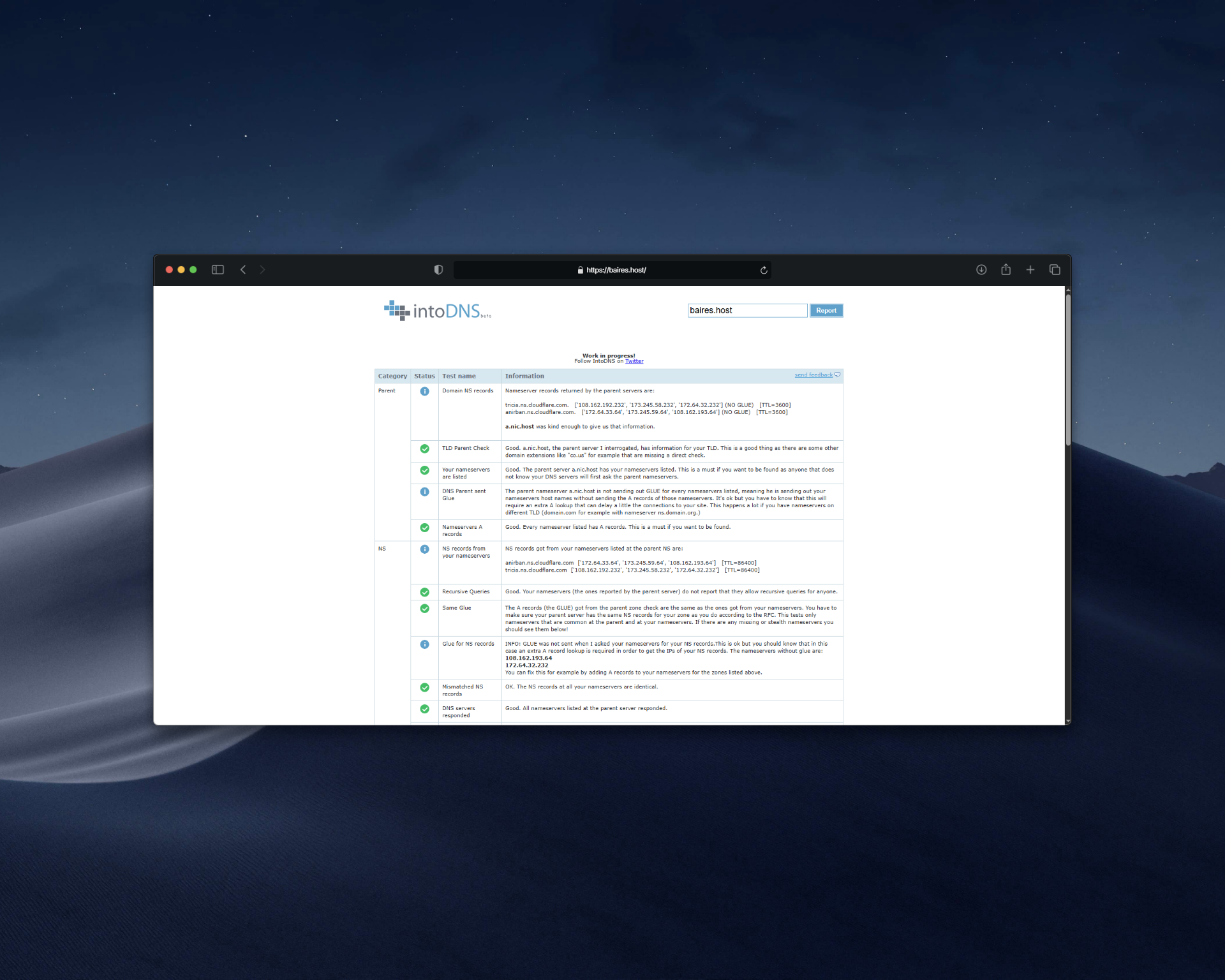 |
| Image 1: Complete DNS analysis with intoDNS. |
mxtoolbox.com
- Go to: https://mxtoolbox.com
- Use DNS verification tools
- Especially useful for verifying MX, SPF, DKIM, DMARC
dnschecker.org
- Verifies DNS record propagation globally
- Useful for verifying that changes have propagated
Verify from terminal
Verify all records:
# See all records
dig ANY yourdomain.com

# See specific records
dig A yourdomain.com
dig AAAA yourdomain.com
dig MX yourdomain.com
dig CNAME www.yourdomain.com
dig TXT yourdomain.com
dig NS yourdomain.com
Verify from specific DNS server:
dig @8.8.8.8 yourdomain.com
dig @1.1.1.1 yourdomain.com
Common problems and how to verify them
Site doesn't load
- Verify that A record exists for the domain
- Verify that the IP is correct
- Verify that the web server is running
- Verify DNS propagation
Email doesn't work
- Verify that MX records exist
- Verify that MX servers are accessible
- Verify SPF, DKIM, DMARC records
- Verify that MX records have correct format
Subdomains don't work
- Verify that A or CNAME records exist for subdomains
- Verify name syntax
- Verify DNS propagation
DNS configuration best practices
- ✅ Always have an A record for the main domain (@)
- ✅ Configure www with CNAME pointing to main domain
- ✅ Use multiple MX servers with different priorities
- ✅ Configure SPF, DKIM, and DMARC for email
- ✅ Maintain appropriate TTL (3600 for production, 300-600 during changes)
- ✅ Regularly verify that configuration is correct
- ✅ Document important DNS changes
Quick verification checklist
Use this checklist to verify your configuration:
- ☐ A record for @ exists and has correct IP
- ☐ Record for www exists (A or CNAME)
- ☐ MX records exist (if using email)
- ☐ SPF record exists (if using email)
- ☐ Nameservers are correct
- ☐ No syntax errors
- ☐ Changes have propagated
- ☐ Destination servers are accessible
Need help?
If you find problems in your DNS configuration or need help verifying, open a ticket from the billing.baires.host panel or contact us for support.
You can also reach us through our social media:
- Instagram: @baires_host
- Discord (active support): https://discord.gg/dzjauatAFN
- Linktree: https://linktr.ee/baires.host